
- Published on
How To Use Euclid Launch
In this blog post, we’ll discuss Euclid Launch, where you can create your own tokens and make them tradable across all networks supported in the Euclid ecosystem. After reading this piece, you will be able to:
- Launch new tokens and pools
- Buy, sell and use vouchers
- Make gasless trades Let’s dive right in!
What is Euclid Launch?
Euclid Launch is a platform for creating new tokens on Euclid’s Virtual Settlement Layer, making it accessible on 50+ chains in the Euclid ecosystem. It’s the go-to destination for anyone looking to launch their tokens, with gasless trading and lightning-fast transactions for buying and selling.
Why Trade Using Euclid Launch?
If you’re an avid crypto trader and perform several on-chain transactions every day, you need to know the benefits of trading on Euclid Launch:
- Gasless Transactions: When you trade on Euclid Launch, all transactions are gasless and settle instantly.
- No Chain Gymnastics: Vouchers are chain-agnostic. You can simply hold vouchers in one network and use them to buy any other token regardless of the native network. As long as you use the same wallet address for all networks, trading does not require constant wallet switching.
- Effortless Trading: Trading on Euclid Launch is simple and intuitive, you don’t need to worry about pool mechanics, swap routes, or complex settings. Just choose a token and trade instantly.
- Withdraw Anywhere: After trading, you can withdraw the balances to native tokens in any supported network. You can on or off-ramp liquidity from Euclid Launch with a few simple steps.
Euclid Launch is ideal for high-frequency traders, speculators, and altcoin traders with multi-chain portfolios.
Why Use Euclid Launch to Create Tokens?
Euclid Launch offers many benefits for token issuers:
- Simple, No-Code Deployment: Launch a token without dealing with code using an intuitive interface that takes less than a minute.
- No Liquidity Dilution: A token listed on Euclid Launch is tradable on all chains connected to Euclid from a single pool; there’s no need to create separate pools for every chain.
- Wide User Base: Traders from several networks use Euclid protocol frequently, and you will gain access to all of them as a token issuer on Launch.
- Native Standards: Euclid creates tokens on-chain using native standards, which is ERC20 in EVM so that your tokens are composable outside Euclid’s ecosystem as well.
Euclid Launch is ideal for all kinds of token issuers, from serious innovators looking to reach multiple ecosystems to speculators minting memecoins.
How to Use Euclid Launch
This section covers tutorials for performing various operations on Euclid Launch. Before proceeding, you must be familiar with vouchers on Euclid protocol and how to obtain them. If you’re not familiar with vouchers, please read this article before proceeding further.
Connect Wallet and Explore Tokens
Euclid Launch is divided into four sections:
- Explore: view token listings and make trades
- Create: create a new pool for an existing token
- Launch: create a new token
- Portfolio: manage owned vouchers and tokens
Explore Tokens
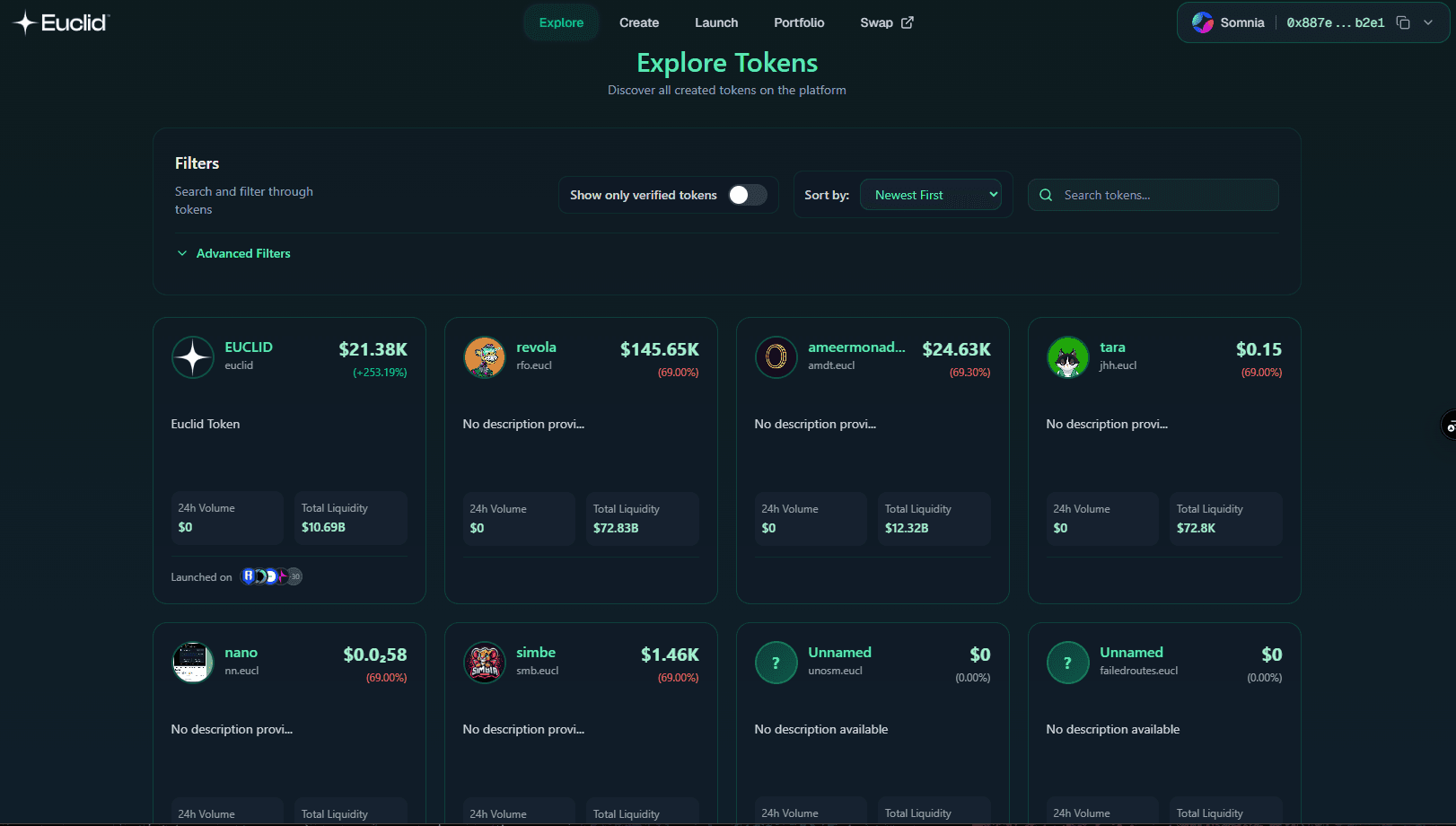 Begin by connecting your EVM wallet, and then go to ‘Explore.’ This is where you will find all the tokens listed as vouchers on the platform. You can surf the page or use advanced filters to find tokens with specific characteristics. The following advanced filters are available:
- Search
- Sort by name, date, or price
- Verified tokens
- Price changed over a period
- Market cap range
- 24hr volume
- Native network
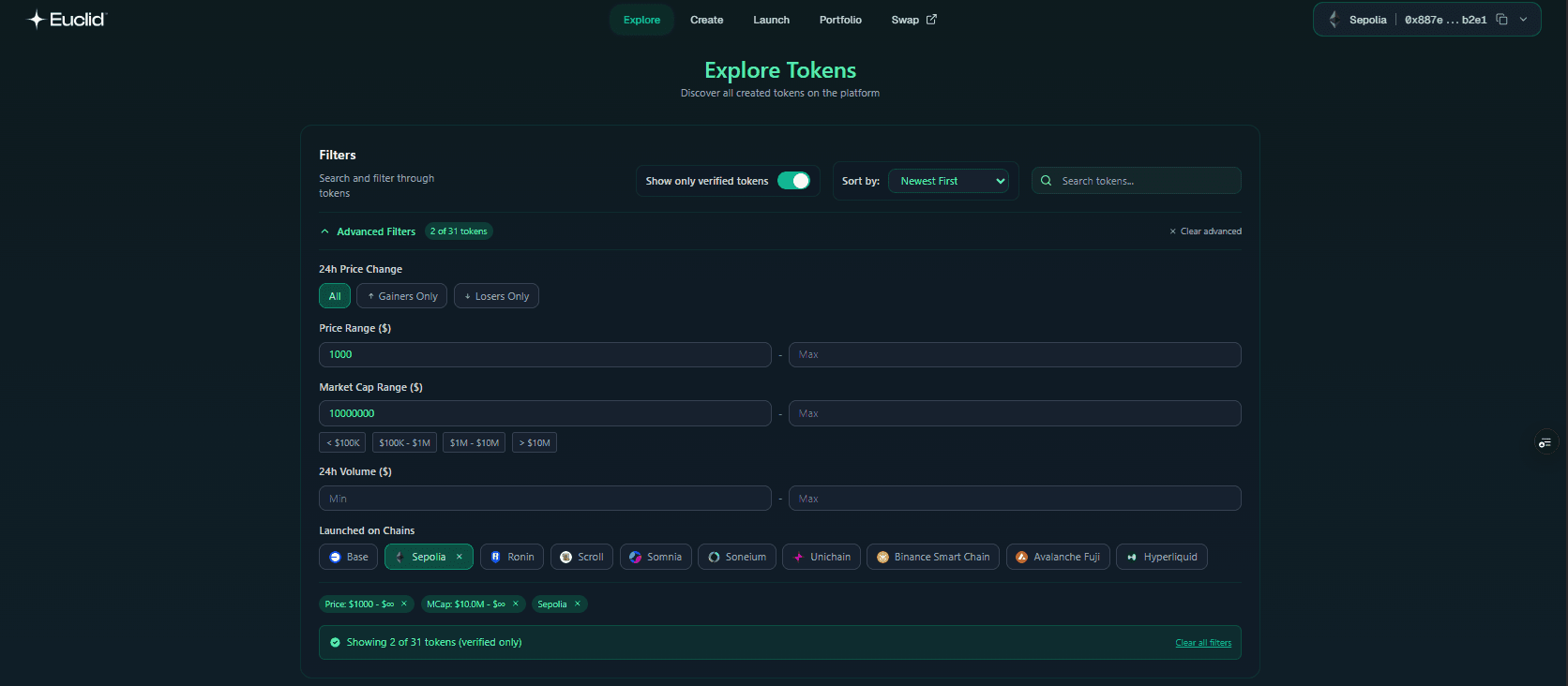
Use the advanced filters in any combination to easily filter the characteristics you desire.
Note on Verified Tokens: We go through token metadata and mark key tokens as verified for your convenience. You must still do your due diligence before buying any token. Always verify the token address and ensure that the token you’re viewing is the one you intend to buy.
Deposit Voucher Tokens
You must deposit vouchers to trade on Euclid launch. This is how we offer instant settlements and gasless transactions on the platform.
Portfolio
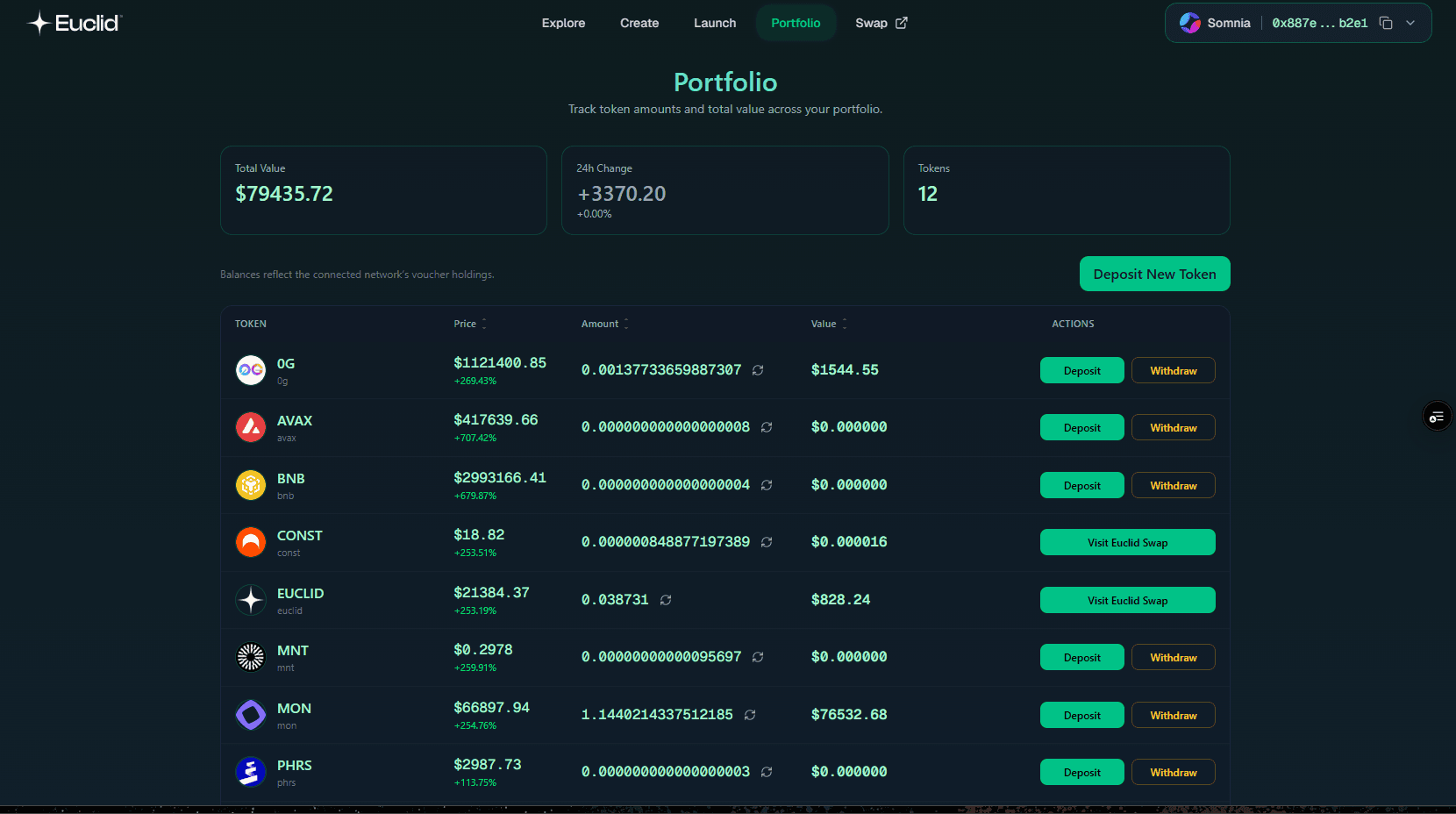 The Portfolio page lets you manage your voucher balances on Euclid Launch. Once you have vouchers in your wallet, follow these steps to deposit them into your Launch account:
- Go to the ‘Portfolio’ section and select the ‘Deposit New Token’ button.
- Ensure vouchers are in the same wallet used to sign into Launch. Select the desired token from the list, and it will be listed in your Portfolio.
- Find the listed token in your portfolio and select ‘Deposit.’
- Enter the number of vouchers you want to deposit and select the chain where you want to make that deposit.
- Sign the transactions and wait for confirmation.
- The tokens are deposited as vouchers in your Launch portfolio. If the updated balance is not visible, hit the refresh button beside the amount, and the balance will update.
Note: To deposit Cosmos-based voucher tokens, you’ll need to use Euclid Swap, as Euclid Launch only supports connections from EVM wallets.
Buy/Sell Tokens
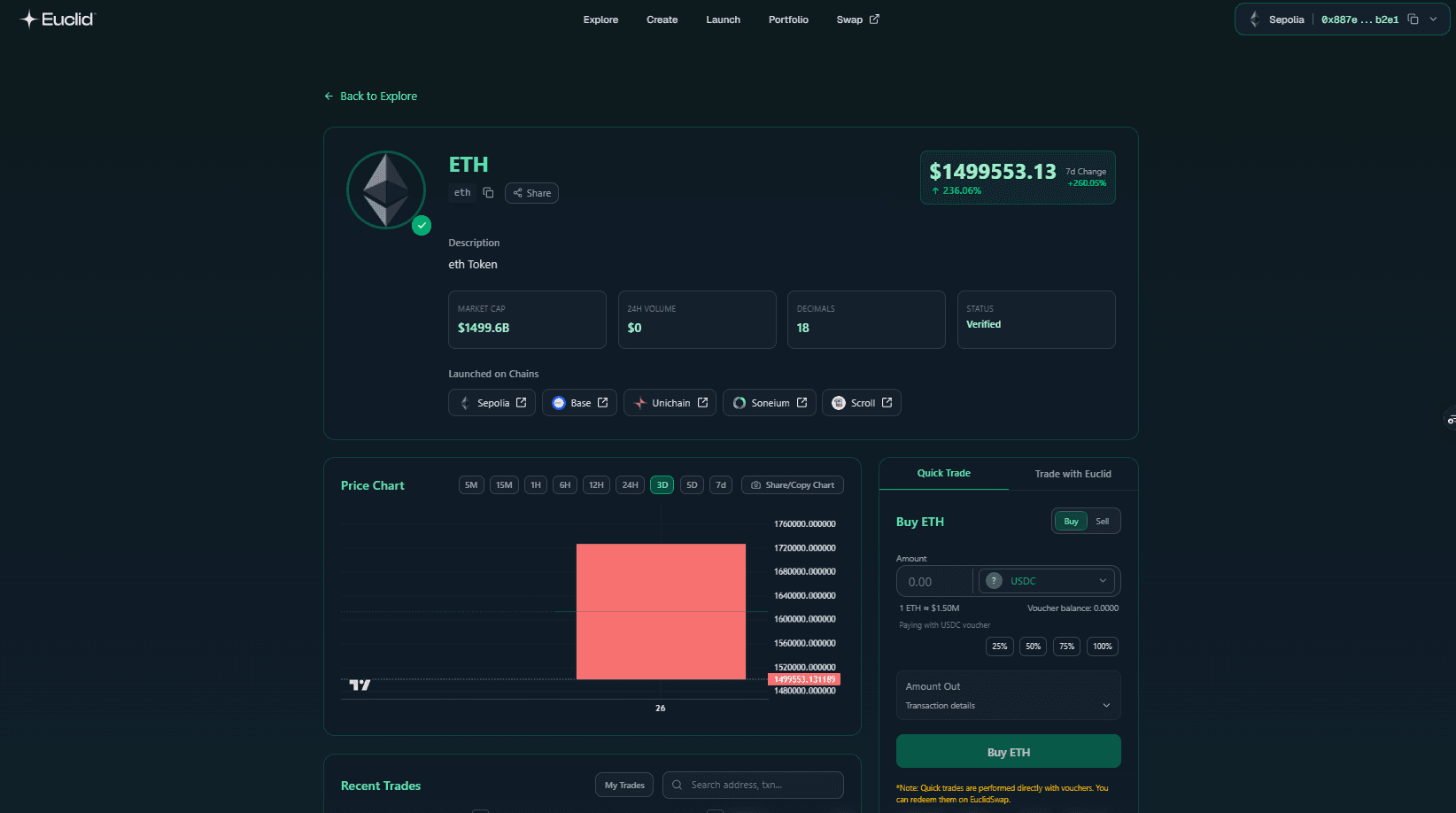 The trading experience on Euclid Launch is as snappy and familiar as any CEX, but with the decentralization of VSL. You can buy any token on the platform with any voucher in your portfolio without worrying about the underlying liquidity pools used, and without needing to sign transactions at every step!
The Launch also offers these trading features:
The trading experience on Euclid Launch is as snappy and familiar as any CEX, but with the decentralization of VSL. You can buy any token on the platform with any voucher in your portfolio without worrying about the underlying liquidity pools used, and without needing to sign transactions at every step!
The Launch also offers these trading features:
- Candlestick chart for technical analysis
- Trading activity info
- Token information
You can buy tokens on its trading page from the explorer. Watch the following video to watch the process.
Launch a New Token & Pool
Creating new tokens is very simple on Euclid launch. All you really need is adequate liquidity in another token to fund the newly launching pool, while the platform creates the tokens and launches the pool within just a few clicks. Token Contract Location and Standards Euclid Launch supports the Ethereum ecosystem. If you’re on an EVM network, you’re launching an ERC-20 token in the network used to sign into the platform. Follow these steps to launch a token:
- Sign in to the app and switch to the network where your token should belong natively.
- Enter Euclid Launch and click on ‘Launch Tokens.’
- Create a name, symbol (ticker) for the token,s and select one option from token supply (1M, 10M, 100M). Click on ‘Launch Token’ and sign the transaction. That’s it, you just created a token on Euclid Launch. Note that new tokens will launch as vouchers by default, but you can withdraw the native tokens at any time. Verify the transaction on the blockchain explorer and also check your wallet, which will have all the newly created liquidity. Remember that no one can buy your token unless you launch a liquidity pool to make it tradable.
Launch a New Pool
Euclid Launch also allows you to launch new pools for newly created tokens. Pairing your newly created tokens against another asset is imperative to make them tradable in the Euclid ecosystem. Users should also ensure they asset they choose to pair their token with is already paired with at least another distinct asset to enable price and swap path discoverability. We recommend using the most liquid tokens like ETH, USDC, USDT, EUCLID, or network native tokens. You must follow these steps to create a new pool:
- Find the tokens you want to launch a pool for on Euclid Launch and open the token’s page.
- Click on the chain tab as shown in the video to find the tokens contract on the blockchain explorer. Copy the token's address from the explorer page and return to Launch.
- Paste the token's address in the launch new pool page and wait for the app to identify the tokens.
- Select the number of vouchers you want to fund the pool with.
- Select the pair token and the balance. These many tokens must be in your wallet as vouchers. Hit ‘Review & Edit Pool Details.
- Cross-check token details like the address, symbol, and credentials. Finally, hit ‘Review Final Details.’
- Select ‘Confirm Pool’ on the final page and wait for the transaction to confirm.
That's it, you just launched a new pool.
Withdraw Tokens
Once you are done trading, Euclid Launch lets you withdraw your vouchers to native tokens in any supported network. Follow the instructions to withdraw your tokens:
- Copy the withdrawal address, and ensure using a supported network to avoid the risk of losing the tokens.
- Go to ‘Portfolio,’ find the tokens in the list, and click ‘Withdraw.’
- Enter the withdrawal amount and paste the destination address.
- Click on ‘Withdraw’ and wait for the transaction to confirm.
Once the transaction is completed, the native tokens will appear in your wallet.
With this, we conclude the Euclid Launch Tutorial. This product is presently in Public Testnet, with the mainnet version planned for Q1 2026 release with Euclid’s Private Mainnet. Euclid Protocol’s vision is to bring users back to the fundamentals of DeFi — empowering users with transparency, accessibility, and control over their financial activities — making DeFi great again! Check out our X feed thread for more insights and updates. Additional links to our socials are here: TG | Web | Blog